
Here’s a full, detailed, publish-ready blog post on Azure Hub and Spoke Architecture, written with clear theory + practical steps + real-world insight — exactly in the style of a comprehensive tutorial you can publish directly.
In modern cloud networking, organizing your Azure environment around basic flat networks quickly becomes unmanageable as systems scale. As businesses grow, they need a network design that provides centralized control, isolation, security, and scalability without duplicating resources in every workload environment.
One of the most effective patterns for this purpose is the Hub and Spoke network architecture on Azure. This design provides a scalable and secure way to connect multiple environments — such as development, testing, staging, and production — while centralizing shared network services and enforcing consistent policies. (Microsoft Learn)
In this guide, we’ll walk through:
✔ What Azure Hub and Spoke Architecture is
✔ Why it matters in enterprise cloud networks
✔ Core components and how they interact
✔ Step-by-step implementation concepts
✔ Real-world best practices and traffic flow
✔ Typical use cases and trade-offs
🧠 What Is Hub and Spoke Architecture?
The Hub and Spoke network topology is a cloud networking pattern where a central “hub” virtual network (VNet) connects to multiple “spoke” VNets for isolated workloads. In this model, the hub serves as a centralized point of connectivity for shared services, security controls, and connectivity to on-premises networks, while spokes host specific application workloads or business units. (Microsoft Learn)
In other words, the hub is the control plane, and the spokes are the workload environments. All traffic between spokes generally flows through the hub, allowing centralized governance, security inspection, and shared services enforcement. (Microsoft Learn)
🧠 Why the Hub and Spoke Model Is Useful
Traditionally, networks were flat — meaning all resources shared the same network space. While this is simple, it quickly becomes problematic when multiple teams, environments, security zones, or compliance requirements are involved.
A hub-and-spoke network solves these issues by enabling:
Centralized Shared Services
The hub can house shared services, such as firewalls, VPN/ExpressRoute gateways, Azure Firewall, DNS, and monitoring tools. Since these are shared, you avoid deploying duplicate services for each environment. (Microsoft GitHub)
Isolated Workloads
Each spoke can be dedicated to a specific environment — for example, Dev, Test, Prod, Analytics, or Departmental networks. This isolation improves security and reduces the chance of accidental cross-environment leaks. (C# Corner)
Security and Policy Enforcement
Because the hub controls traffic flow and houses security appliances, policies can be enforced consistently across spokes. This simplifies compliance and centralizes rule management. (CloudThat)
Scalability and Cost Efficiency
Adding spokes as your organization grows doesn’t require redesigning the entire architecture. Shared services in the hub also reduce costs because you deploy them once rather than in every isolated network. (Microsoft GitHub)
Gateway Simplification
If your Azure environment connects to on-premises networks or other cloud providers, the hub typically handles these connections through ExpressRoute or VPN gateways, centralizing the pathway. (Microsoft Learn)
🧩 High-Level Hub & Spoke Architecture Flow
Below is a minimal hand-drawn style diagram describing the core components and traffic flow:
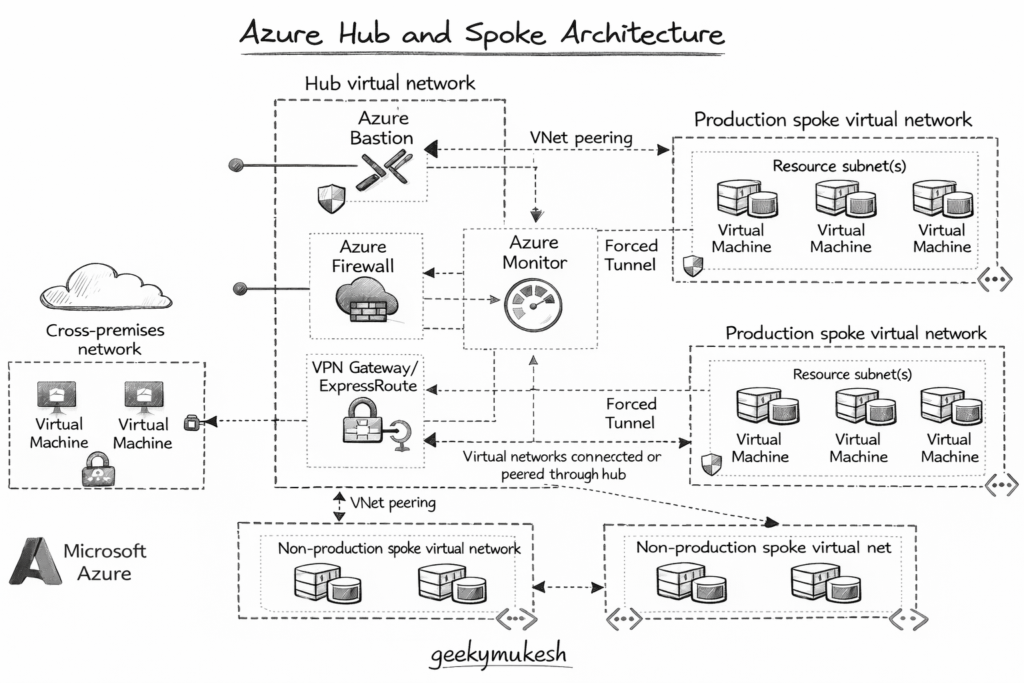
Diagram description:
This diagram shows the hub virtual network in the center with shared services (firewall, VPN gateway, monitoring), and multiple spokes branching out for isolated workload environments. Spoke traffic flows through the hub, enabling centralized policies and connectivity.
🛠 Core Components of Azure Hub & Spoke Architecture
1️⃣ Hub Virtual Network (VNet)
The hub is the central VNet that contains shared infrastructure and services that all spokes need access to. Typical services in the hub include:
- Azure Firewall – For security inspection and policy enforcement
- Virtual Network Gateway – For connectivity to on-premises networks (VPN/ExpressRoute)
- Bastion / Azure Bastion Host – Secure jump host for admin access
- DNS or Private DNS Zones – Central name resolution
The hub acts as the “network control plane.”
2️⃣ Spoke Virtual Networks (VNets)
Spokes are separate VNets connected to the hub via VNet peering. Each spoke can represent:
- A specific environment (Dev, QA, Prod)
- A business unit’s resources
- A regional or departmental workload domain
Spokes are isolated from each other by default — meaning they cannot communicate directly unless configured to do so. This isolation provides security boundaries and keeps workloads compartmentalized. (Microsoft Learn)
3️⃣ VNet Peering
VNet peering connects the hub and each spoke. Peering enables low-latency, private network traffic within Azure’s backbone, without gateways. It also allows resources in spokes to communicate with the hub, while still enforcing network security and routing rules. (GitHub)
🔧 Practical Implementation Overview
In a typical implementation, you would:
Step 1 – Create the Hub VNet
In the Azure portal or via CLI, you define a central VNet that will house shared services.
Example CLI snippet:
az network vnet create \
  --name HubVNet \
  --resource-group rg-hub-spoke \
  --location eastus \
  --address-prefix 10.0.0.0/16
This command creates the hub VNet. You then add subnets to host network appliances such as Azure Firewall or VPN gateways.
Step 2 – Create Spoke VNets
Create separate VNets for your spoke environments, each with unique address spaces. For example:
az network vnet create \
  --name SpokeDevVNet \
  --resource-group rg-hub-spoke \
  --location eastus \
  --address-prefix 10.1.0.0/16
Repeat for additional spokes, ensuring distinct CIDR blocks so they do not overlap. (Medium)
Step 3 – Establish VNet Peering
Peering connects the hub and spoke networks. You must enable bi-directional peering:
az network vnet peering create \
  --name HubToSpokeDev \
  --resource-group rg-hub-spoke \
  --vnet-name HubVNet \
  --remote-vnet SpokeDevVNet \
  --allow-vnet-access true
Repeat the reverse peering and for other spokes. Bi-directional connectivity is what allows the spokes to communicate over the hub. (GitHub)
Step 4 – (Optional) Add Gateway and Security Services
In the hub VNet, create:
- Azure Firewall for centralized traffic inspection
- VPN/ExpressRoute Gateway for hybrid connectivity
- User-Defined Routes (UDRs) to control traffic paths
These services ensure that traffic from spokes flows through your security stack and that routing policies apply uniformly. (Microsoft Learn)
🧠 How Traffic Flows in Hub & Spoke
In the hub-and-spoke model:
- North-south traffic refers to traffic entering or exiting Azure (e.g., from the Internet or on-premises). The hub handles inbound/outbound networking, ingress, and egress.
- East-west traffic refers to traffic between spokes. By default, spokes cannot talk directly to each other; it must go through the hub for inspection or policy enforcement. This provides a security advantage. (Microsoft Learn)
For performance optimization, you can also configure inter-spoke connectivity patterns using Azure Virtual Network Manager or direct peering, reducing traffic load on the hub for internal communication. (Microsoft Learn)
📈 Real-World Benefits of Hub & Spoke Architecture
This pattern is widely used by enterprises because it provides:
🔐 Centralized Security
Because all traffic can be routed through network appliances in the hub, you can enforce security policies consistently. (CloudThat)
🔄 Isolated Workload Environments
Spokes can represent different teams, environments, or business units, and isolate them from one another to prevent noisy neighbor issues. (Microsoft GitHub)
📊 Simplified Management
Shared services such as monitoring, logging, and security policies can be managed from one central place, reducing complexity. (Cloudutsuk)
🎯 Cost Efficiency
Deploying shared services once in the hub — rather than replicating them in every environment — reduces consumption and maintenance costs. (Cloudutsuk)
🚧 Trade-offs & Considerations
No architecture is perfect. Some considerations include:
- Latency: Because traffic often routes through the hub, there may be additional hops compared to direct peer-to-peer communication. (LinkedIn)
- Complexity: Initial setup and routing configuration (UDRs, gateways) require careful planning. (Microsoft Learn)
- Single Point of Policy: The hub centralizes policy, so misconfiguration can affect all spokes if not tested properly.
Despite these, the benefits often outweigh the drawbacks for medium to large deployments.
🏁 Conclusion
Azure Hub and Spoke Architecture provides a scalable, secure, and manageable way to connect cloud environments. By centralizing shared services in a hub and isolating workloads in spokes, organizations can achieve:
- Easier governance
- Centralized policy enforcement
- Cost savings
- Enhanced security
- Simplified operations
Whether you are designing multi-tenant environments, hybrid architectures with on-premises connectivity, or large enterprise networks, this pattern is widely recognized as a best practice in Azure networking. (Microsoft Learn)
If you are building cloud-native platforms at scale, network architecture becomes as important as application design. You may also find it helpful to read my detailed guide on Kubernetes in 2026: The Ultimate 8-Week Learning Roadmap, which explains how modern workloads, networking, and automation fit together in real production environments.

Leave a Reply